





AI shopping is changing how customers discover, compare, and buy products from Shopify stores. Instead of starting every purchase with a traditional search query, shoppers can now ask ChatGPT, Gemini, Google AI Mode, Copilot, and other AI search tools for recommendations based on fit, budget, use case, style, urgency, and personal preferences. Preparing your store means making your product data clear, complete, trustworthy, and conversion-ready so AI systems can understand what you sell and shoppers can confidently take the next step.
For Shopify merchants, this is not only a technical SEO project. It is a full-funnel exercise that connects product data, structured content, policies, checkout experience, conversion optimization, and customer trust. The better your store explains each product in human and machine-readable ways, the more prepared you are for ai-driven sales and long-term shopify success.

What does AI shopping mean for Shopify stores?
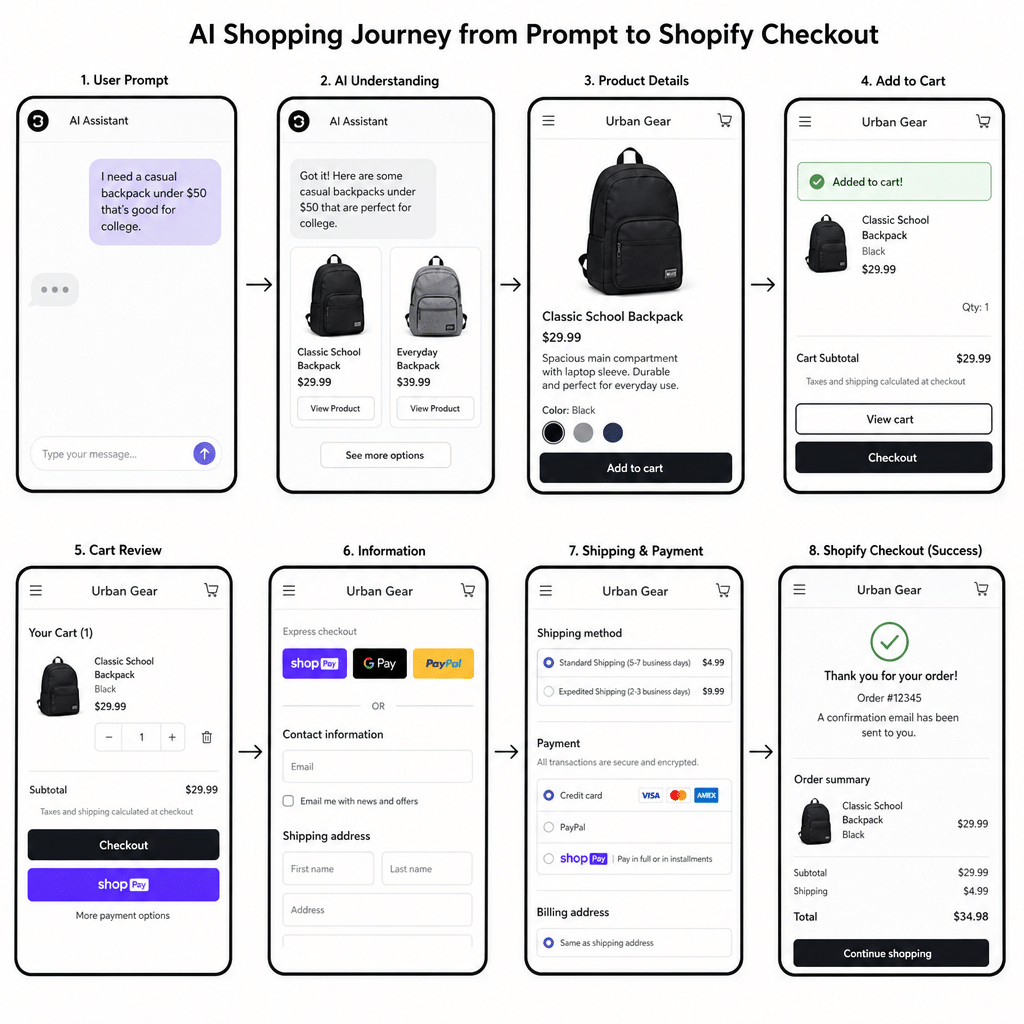
AI shopping means customers can use conversational tools to find products without manually browsing dozens of search results or category pages. A shopper might ask for “a gift under $75 for a runner who travels a lot,” “a non-toxic crib mattress with washable covers,” or “a black linen dress for a beach wedding,” and the AI system may compare products, summarize options, and send the shopper toward a merchant’s product page or checkout.
The important shift is intent. Traditional ecommerce SEO often focuses on ranking for fixed keywords. AI search focuses more on matching a product to a specific situation. That means your Shopify store needs to answer not only what the product is, but who it is for, when it is useful, what problem it solves, what tradeoffs matter, and why a customer should trust the information.
Official Shopify guidance describes ChatGPT as a discovery-focused referrer platform for eligible Shopify stores, with purchases completed through the merchant’s online store checkout rather than a separate ChatGPT checkout setting in Shopify Admin. Shopify also notes that eligible products can be made discoverable through Shopify Catalog, while Google AI Mode and Gemini availability is handled through the Google & YouTube sales channel for eligible stores.
distinguish visibility problems from product-page or checkout friction.
AI search rewards product clarity, not keyword stuffing
AI systems need clean signals. They read product titles, descriptions, images, specifications, availability, shipping information, policies, reviews, category structure, and broader site context to understand whether your product fits a shopper’s request. If your product page is thin, vague, inconsistent, or overloaded with decorative language, the AI has less useful information to work with.
This does not mean abandoning SEO keywords. It means using them in a more natural, buyer-centered way. A page optimized for “waterproof hiking backpack” should also explain capacity, intended trip length, laptop fit, weight, material, pocket layout, care instructions, and whether it works for commuters, day hikers, or weekend travel. That context helps both humans and AI-driven systems understand relevance.
For Shopify optimization, treat every product page as a structured answer. The page should make it easy to extract the basics, compare alternatives, and verify purchase details. If an AI tool summarizes your page for a shopper, it should find enough accurate information to describe the product without guessing.
The core signals AI shopping systems need
Strong AI-ready product pages usually include:
- Specific product titles that identify the product type, brand or collection, key attribute, and variant when relevant.
- Plain-language descriptions that explain use cases, benefits, limitations, and ideal customers.
- Structured specifications such as dimensions, materials, ingredients, compatibility, capacity, care, size, weight, or included accessories.
- Accurate price and availability so shoppers are not sent toward products that are out of stock or mismatched with the listing.
- High-quality images showing the product from multiple angles and in realistic context.
- Clear shipping, return, and policy information that reduces uncertainty before checkout.
- Consistent product taxonomy so categories, tags, collections, and variants match how buyers actually shop.
Google’s Merchant Center documentation emphasizes that structured data helps Google retrieve up-to-date product and offer information from product landing pages, and Google recommends matching schema.org values to product data specification attributes where supported.
Preparing for ChatGPT product discovery
ChatGPT shopping is built around conversational product discovery. A customer can describe what they want, refine the search, compare options, and click through to merchant sites when relevant. OpenAI’s help documentation says ChatGPT may show product options with images, product details, and links when it detects shopping intent, and that product results are selected independently rather than as ads.
For Shopify merchants, the practical task is to make your catalog easy to understand and up to date. OpenAI and Shopify both describe Shopify Catalog as a path that helps Shopify product data appear more accurately and completely in relevant ChatGPT shopping conversations. Shopify’s help documentation also notes that merchants can remove ChatGPT’s access to product data through Shopify Catalog, although products may still be referenced through other discovery methods such as web crawling and indexing.
ChatGPT integration starts with catalog readiness
A useful chatgpt integration strategy does not begin with a chatbot widget. It begins with your product feed, your storefront content, and your checkout path. If your Shopify catalog contains incomplete variant names, missing images, unclear descriptions, or inconsistent availability, the discovery experience can become weaker before a shopper ever reaches your site.
Review your products from the perspective of a customer asking a conversational question. Would your product page clearly answer “Is this good for sensitive skin?” “Will it fit in a carry-on?” “Is it compatible with my device?” “Can I return it if it does not fit?” If the answer is buried, missing, or only implied, add the information in a clear and structured way.
Product descriptions should support summaries
ChatGPT may simplify or summarize product information for shoppers, so your source content should be concrete. Avoid descriptions that rely only on mood, lifestyle, or brand language. “Designed for effortless everyday confidence” may sound polished, but it does not explain the fabric, fit, occasion, care, or sizing.
A stronger description combines context and specifics. For example, a clothing product page can explain fabric feel, stretch, opacity, fit notes, model measurements, seasonality, care, and styling use cases. A consumer electronics page can explain compatibility, ports, battery expectations, included items, warranty coverage, and setup requirements without forcing shoppers to infer details.
Policies and disclosures matter
Shopify states that stores selling on ChatGPT need completed Terms of service, Privacy policy, and Return and refund policy in Shopify Admin. Shopify also advises that relevant legal disclosures should appear in the first 6,000 characters of product descriptions.
That guidance has a practical conversion benefit. AI shopping often compresses the research phase, so shoppers may arrive with a narrowed shortlist and a few final objections. Clear policies reduce friction at the moment when a recommendation becomes a decision.
Optimizing for Gemini and Google AI shopping surfaces
Gemini and Google AI Mode connect AI-assisted answers with Google’s broader product discovery ecosystem. For Shopify merchants, Shopify says products are made available to Google AI Mode and Gemini through the Google & YouTube sales channel, and that direct checkout is rolling out to Google users and may not be available in every store.
The practical takeaway is simple: your Google product data needs to be as strong as your Shopify storefront. Many merchants treat the Google & YouTube channel as a feed connection only, but AI shopping makes the quality of that feed more important. Product titles, descriptions, images, GTINs, variants, shipping, returns, and availability all help Google understand and present products in useful ways.
Gemini features depend on understandable product data
When marketers talk about gemini features, they often focus on the shopper-facing experience: conversational recommendations, product comparisons, AI summaries, and assisted decision-making. For merchants, the more important layer is the data behind those experiences. Gemini and Google AI surfaces need reliable product attributes to decide whether a product is relevant to a customer’s prompt.
Use Google Merchant Center as a quality control dashboard, not just a setup task. Fix disapprovals, missing identifiers, image issues, price mismatches, and shipping gaps. Google’s Merchant Center guidance says product data shapes how ads and free listings behave across Google surfaces and recommends maintaining up-to-date price and availability through feed delivery, the Merchant API, or structured data markup.
Use structured product details for complex items
If you sell products with technical or feature-heavy attributes, add structured product detail data where appropriate. Google’s documentation says the product_detail attribute can be used for product-specific information such as package contents, connectivity, ingredient lists, installation instructions, power requirements, and feature lists, while also warning merchants to avoid using it as a keyword list.
This is especially useful for electronics, beauty, supplements, furniture, outdoor gear, appliances, tools, hobby products, and products with compatibility requirements. A clean key-value structure helps AI systems compare products more accurately. It also helps customers understand whether the item meets their needs before they click through.
distinguish visibility problems from product-page or checkout friction.
A practical Shopify optimization checklist for AI search
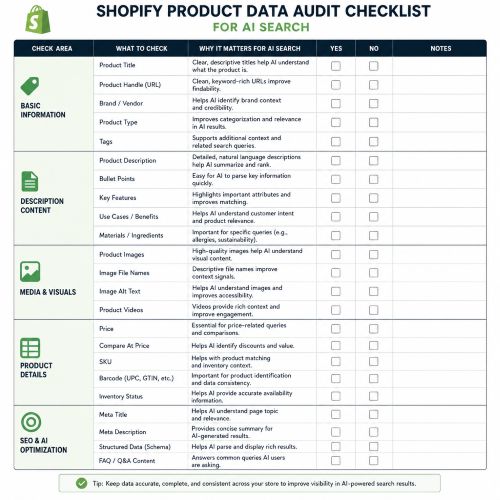
Preparing for AI shopping is easier when you break the work into layers. Start with the data AI systems need to understand your products, then move into content, trust, and conversion optimization. You do not need to rebuild your entire store at once, but you do need a repeatable process.
Use this checklist to audit your Shopify store:
- Confirm channel eligibility and settings
- Review Shopify’s Agentic or AI shopping channel settings available in your admin.
- Check whether Shopify Catalog access is enabled for supported AI channels.
- For Google AI Mode and Gemini, confirm the Google & YouTube sales channel is installed and syncing where applicable.
- Review store policies and make sure required policy pages are complete.
- Clean up product titles
- Put the most important product type and differentiator near the beginning.
- Avoid internal shorthand, vague collection names, or decorative titles that hide what the product is.
- Include variant-defining details only when they help shoppers choose.
- Rewrite weak descriptions
- Explain who the product is for and what problem it solves.
- Include materials, fit, dimensions, compatibility, care, ingredients, or usage details where relevant.
- Add limitations or important conditions so customers are not surprised later.
- Strengthen structured attributes
- Fill in product type, vendor, collections, category, options, SKUs, barcodes, weights, and variants.
- Use metafields for repeatable specifications that do not fit naturally in the main description.
- Map custom data sources when product information is stored outside default Shopify fields.
- Improve image usefulness
- Use clear primary images on simple backgrounds.
- Add lifestyle photos that show scale, use, texture, fit, or context.
- Include variant-specific images where color, size, pattern, or finish changes the buying decision.
- Make policies easy to find
- Clarify shipping times, return windows, refund rules, warranty terms, and product restrictions.
- Put essential product-specific disclosures directly on the product page.
- Avoid sending shoppers to vague policy pages for critical purchase details.
- Test the conversion path
- Visit your product page from mobile and desktop.
- Add to cart, apply discounts, estimate shipping, and reach checkout.
- Remove friction that could stop a shopper who arrives from an AI recommendation.
Shopify’s documentation says Shopify Catalog can list products with title, description, options, images, price, availability, and other key attributes in a structure AI agents can parse, and that Shopify Catalog continuously updates product data for accurate inventory and pricing across AI channels.
Product pages should answer conversational buying questions
AI shoppers ask messy, human questions. They do not always know the exact product name, and they may describe an occasion, constraint, symptom, room, body type, hobby, budget, or comparison. Your product pages should include enough context to match those real questions.
Think beyond “features and benefits.” A feature is what the product has. A benefit is why it matters. A conversational answer explains the situation where that benefit becomes important.
For example:
| Product detail | Weak version | AI-ready version |
| Material | Premium fabric | Midweight organic cotton with light stretch for everyday wear |
| Fit | Flattering fit | Relaxed through the body with a cropped hem; size down for a closer fit |
| Use case | Great for travel | Folds compactly, resists wrinkles, and works as a carry-on layer |
| Compatibility | Works with laptops | Fits most 13-inch laptops; check device dimensions before purchase |
| Care | Easy care | Machine wash cold, lay flat to dry, do not bleach |
This type of content improves both human comprehension and AI extractability. It also supports conversion optimization because it removes uncertainty. When shoppers can picture exactly how the product fits into their lives, they are more likely to move forward.
Add comparison context without attacking competitors
AI search often compares alternatives. Your product pages can help by explaining how a product differs from other products in your own catalog. This is especially useful when you sell multiple versions of a similar item.
Add sections such as “Choose this if…” or “Compare with…” to help shoppers self-select. For example, a skincare brand might explain that one moisturizer is better for daytime lightweight hydration while another is richer for nighttime dryness. A furniture store might compare compact, standard, and deep-seat versions of the same sofa line.
Keep the comparison factual and useful. Do not invent claims about competitors or declare your product “best” without proof. AI systems and cautious shoppers both respond better to grounded detail than hype.
How should you structure product data for AI-driven sales?
Structure product data so every important buying attribute has a clear, consistent home. The main product description should persuade and explain, while fields, metafields, variants, schema, and feed attributes should organize facts that AI systems and shopping platforms need to parse.
Start by identifying the attributes that matter most in your category. Apparel needs size, fit, fabric, color, care, occasion, and model context. Beauty may need ingredients, skin type, scent, usage instructions, warnings, and certifications if verified. Electronics need compatibility, dimensions, power, connectivity, included accessories, warranty, and setup requirements. Furniture needs dimensions, materials, assembly, delivery, weight capacity if known, and room-use context.
Build a product attribute map
Create a simple attribute map for each major product category:
- Core identity: product type, brand, collection, SKU, barcode, category.
- Decision attributes: size, color, material, capacity, flavor, scent, finish, compatibility, or style.
- Use-case attributes: indoor/outdoor, travel, gifting, professional use, beginner-friendly, pet-safe, family-friendly, or other relevant contexts.
- Trust attributes: warranty, certifications, country of origin, care instructions, safety warnings, and compliance details when applicable.
- Commercial attributes: price, compare-at price, availability, shipping weight, fulfillment location, return rules, and bundles.
Once mapped, make those attributes consistent across products. Consistency helps AI systems compare products and helps internal teams maintain quality as the catalog grows.
Use metafields for repeatable information
Shopify metafields are useful when important product information should appear consistently but does not belong in a generic paragraph. For example, you might use metafields for fabric composition, dimensions, ingredients, compatibility, care instructions, sustainability details, or included accessories.
When metafields are well organized, they can support product templates, comparison tables, filtering, and feed mapping. Shopify notes that Catalog Mapping can help when product data such as title, description, and category is stored in custom fields, metafields, metaobjects, tag prefixes, or custom grouping logic.
Conversion optimization for AI-referred shoppers
AI-referred shoppers may behave differently from visitors who browse your homepage. They might arrive deeper in the funnel, already comparing two or three options. They may have relied on an AI summary, so they need immediate confirmation that the product page matches what they were told.
That makes message consistency essential. The product page should confirm the same core details the AI likely surfaced: product type, main benefit, price, availability, shipping expectations, variants, reviews, and return options. If the page feels inconsistent or incomplete, trust drops quickly.
Align the first screen with buying intent
On mobile and desktop, the above-the-fold product page should make the purchase path obvious. Show the product name, price, availability, primary image, selected variant, review summary if available, and add-to-cart button without unnecessary clutter. If shipping thresholds, free returns, financing, or delivery estimates are important to the decision, place them near the buy area.
Do not make shoppers dig for the basics. AI search may send customers to exactly the product they asked for, but the page still has to close the confidence gap. A clean first screen can turn AI discovery into ai-driven sales.
Reduce uncertainty near checkout
Conversion optimization for AI traffic is largely about reducing unresolved questions. Before the cart and checkout, answer:
- When will this ship?
- What does delivery cost?
- Can I return or exchange it?
- Is my size, color, or model available?
- What payment methods are accepted?
- Is there a warranty or satisfaction policy?
- Are there product-specific restrictions?
Shopify says ChatGPT users buying from Shopify merchants complete purchases through the online store checkout displayed in an in-app browser or a new tab, and that the merchant’s checkout customizations, branding, selling strategies, and payment methods are supported.
Content beyond product pages helps AI understand your authority
Product pages are the foundation, but supporting content can help AI search understand your store’s expertise and category relevance. Buying guides, comparison pages, care guides, size guides, ingredient explainers, compatibility guides, and use-case articles all create context around your catalog.
This is where SEO content and AI search overlap. A guide about “how to choose a carry-on backpack for international travel” can support products designed for laptop storage, airline size limits, lightweight packing, and anti-theft features. A skincare routine guide can explain product order, ingredient compatibility, skin types, and usage frequency while linking naturally to relevant products.
The best supporting content does not exist only to rank. It helps shoppers make better decisions. AI systems are more likely to find useful context when your site explains the category in a clear, specific, non-generic way.
Build content around buying decisions
Prioritize content that answers questions close to purchase intent:
- Product comparisons within your own catalog.
- “How to choose” guides for complex categories.
- Size, fit, compatibility, or ingredient explainers.
- Gift guides by recipient, budget, occasion, or interest.
- Care and maintenance guides that reduce returns.
- Setup or installation guides for products that require assembly or onboarding.
Each guide should link to relevant collections and products, but it should also stand alone as genuinely useful. Avoid publishing thin AI-generated posts that repeat obvious advice. Weak content can dilute trust rather than build it.
Technical SEO still matters in AI search
AI shopping does not replace technical SEO. It raises the standard. If your store is hard to crawl, slow to load, inconsistent in structured data, or full of duplicate and outdated pages, AI systems may have a harder time interpreting it accurately.
Shopify now provides agent discovery files such as /agents.md, /llms.txt, and /llms-full.txt by default, with Shopify describing /agents.md as the canonical agent discovery URL and the others as compatible with older AI crawler conventions. Shopify also states that these files do not replace Shopify Catalog capabilities.
Keep the crawl path clean
Review the basics:
- Submit and maintain XML sitemaps.
- Keep important products indexable unless you intentionally want them hidden.
- Remove or redirect obsolete product URLs.
- Avoid duplicate product pages caused by unnecessary URL parameters.
- Use canonical tags correctly.
- Make sure collection pages have useful text and logical internal links.
- Keep robots.txt rules aligned with your discovery goals.
If you hide products from AI channels, understand the tradeoff. Shopify cautions that setting a product as Unlisted to hide it from AI discovery also hides it from sitemaps, search engines such as Google, and online store search.
Validate structured data
Structured data should match the visible page. If your schema says a product is in stock at one price while the page shows another, trust suffers. Google’s Merchant Center documentation specifically notes that specifying schema.org properties such as price, priceCurrency, availability, and condition can improve the accuracy of automatic item updates.
Make validation part of your publishing process. Test product templates, variant behavior, sale pricing, out-of-stock states, and review markup. The goal is not simply to “have schema,” but to make sure structured data stays accurate as inventory changes.
Measurement connects AI traffic to Shopify success
AI shopping will only matter commercially if you can measure what happens after discovery. Track AI-referred sessions, product page engagement, add-to-cart rate, checkout completion, assisted conversions, revenue, returns, and customer quality where your analytics setup allows it.
Do not judge the channel only by last-click revenue at first. AI discovery may influence customers before they return through branded search, email, direct traffic, or paid remarketing. Use UTM discipline where available, monitor referral sources, and compare behavior across product categories.
Watch the metrics that reveal friction
Useful metrics include:
- Product detail page conversion rate from AI-referred traffic.
- Add-to-cart rate by product and variant.
- Checkout abandonment rate for AI-referred sessions.
- Out-of-stock click patterns on products that receive discovery traffic.
- Return rate and reason codes for products promoted through AI discovery.
- Search queries and customer support questions that reveal missing product information.
If AI traffic visits but does not convert, the issue may not be visibility. It may be unclear product positioning, weak imagery, missing shipping information, poor reviews, confusing variants, or a checkout concern. Treat the data as a merchandising feedback loop.
A 30-day action plan for AI-ready Shopify optimization
You can make meaningful progress in one month by focusing on your highest-impact products first. Start with best sellers, high-margin items, seasonal products, and products that require explanation before purchase.
Week 1: Audit and prioritize
Export your product catalog and identify missing titles, descriptions, images, prices, availability, categories, variants, SKUs, barcodes, and metafields. Check Shopify channel settings, policy completion, Google & YouTube sync, and Merchant Center diagnostics. Choose 20 to 50 priority products rather than trying to fix everything at once.
Week 2: Improve product content
Rewrite weak descriptions with clear use cases, specifications, benefits, and limitations. Add comparison notes for similar products. Improve product titles and make variant names easier to understand. Add missing policy details or product-specific disclosures where needed.
Week 3: Strengthen feeds and structured data
Fix Merchant Center issues, review structured data, confirm price and availability accuracy, and map important custom fields. For products with technical specifications, organize details into clean, repeatable fields. Check whether your images meet the quality standards expected by shopping surfaces.
Week 4: Optimize conversion and measurement
Test the product page and checkout experience on mobile. Add trust messages near the buy area, clarify shipping and returns, and remove unnecessary friction. Set up reporting segments for AI and referral traffic where available, then monitor add-to-cart and checkout behavior by product.
The future of Shopify success is conversational
AI search is moving ecommerce from keyword matching toward intent matching. Shoppers will increasingly describe what they need in natural language and expect AI tools to narrow the field. Shopify merchants that invest in clean data, useful content, strong policies, and frictionless checkout will be better positioned for that shift.
The goal is not to chase every new platform feature. The goal is to make your store understandable, trustworthy, and easy to buy from wherever discovery happens. If your catalog is accurate, your product pages answer real buying questions, and your checkout experience supports confident decisions, your store is better prepared for ChatGPT, Gemini, and the next generation of AI search.
distinguish visibility problems from product-page or checkout friction.